
In this blog series, members of our national Pathways to Politics community share practical insights into how they’re using AI in real-world political contexts, tips on where AI can be useful, lessons they’ve learned along the way, and areas where they believe caution is needed.
Cr Elisha Lee

Cr Elisha Lee was elected as Councillor for the City of Monash in 2024, and as Deputy Mayor for the 2025-2026 term. Elisha is a proud Korean-Australian, and Victoria’s first ever Korean-Australian Councillor. She is an alum of the 2024 Victorian program.
I use AI to save time on administration so that I can spend more time listening to residents, building relationships and exercising good judgement. AI is an excellent aid, but I have clear parameters for why and how I use it.
1. Use AI to maintain a professional and consistent brand
Consistency builds trust and recognition. Voters should be able to identify your campaign materials instantly and make the connection back to you.
Tools like Canva allow you to save your campaign colours schemes, fonts, logos and templates so that you can apply consistently throughout all collateral, ensuring everything looks cohesive. (Canva is not purely an AI tool, but a visual design platform that features built-in AI capabilities.) During my campaign, I used Canva for:
– Social media graphics
– Letters and DL flyers
– How-to-vote cards
– Event invitations.
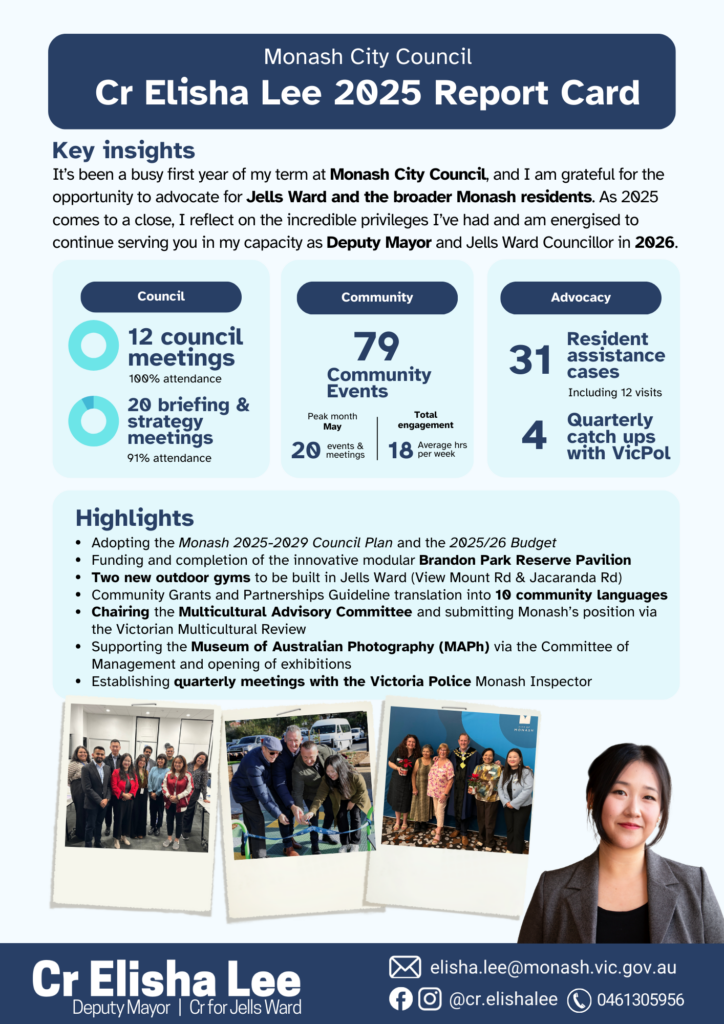
Even as a councillor, I continue to use Canva for resident communications, presentations and my year-end report card.
2. It’s all about the prompts and settings
The quality of AI output depends heavily on the quality of the context you provide. “Rubbish in rubbish out”!
- Create a login profile and teach the AI who you are, which helps generate responses that are far more tailored and authentic. You can save details and your preferences such as:
– Your values and priorities
– communication style
– electorate and key issues
– policy positions
– preferred tone. - I prefer to use AI in ‘thinking mode’, even if responses take slightly longer.
- Prompts should be as detailed as possible – describe the situation, the context and nuancing, what action you are seeking, how short or long the response should be.
2. Experiment with different AI tools
Different tools have different strengths. See which tool you find the most useful. Think of AI tools like members of a team, each has a different skill set.
- ChatGPT is excellent for drafting, brainstorming and refining communications but tends to provide answers quickly and can sometimes be overly agreeable, so expect to iterate.
- Claude often asks follow-up questions before generating an answer and is particularly useful when thinking through complex issues.
- Microsoft Copilot is usually approved in many corporate and government workplaces. It is excellent for summarising lengthy documents, extracting key themes and transcribing meetings so you can focus on participating rather than taking notes.
4. Use AI as a starting point, not the final product
- AI can assist your thinking, but it cannot replace your judgement.
- Always be mindful that AI can get facts wrong (Reddit is the most cited source by AI platforms!), cite information from the wrong jurisdiction, reflect biases in its training data.
- AI is also unlikely to capture local political nuances and context.
- Therefore be conscious that AI can generate persuasive but inaccurate content.
- You should not rely on AI for drafting policy positions, preparing speeches, writing media statements or responding to contentious issues.
- Always ask for sources and URL citations and read original documents. Verify facts independently. Sense-check whether the output aligns with your values and political judgement.
- Remember that you remain accountable for everything that carries your name!
Full contributions
- Dr Josephine Okurame, AI educator and researcher
- Cr Elisha Lee, Deputy Mayor City of Monash
- Susanne Newton, former Mayor City of Darebin
- Ruth McGowan, former Mayor of Baw Baw Shire Council and author of Get Elected
- Cr Leanne Patrick, Gladstone Regional Council
- Elisa Choy, founder of Australia’s first AI-powered strategic market research company
Contributors to this series:
- Dr Josephine Okurame, AI educator and researcher:
AI as a thinking partner, tips for policy translation, interview preparation, pressure-testing ideas and fact-checking.
- Cr Elisha Lee, Deputy Mayor City of Monash:
Tips for saving time, campaign branding, good prompts, choosing the right AI tools, accuracy and accountability.
- Susanne Newton, former Mayor City of Darebin:
AI as a tool for good, importace of authenticity, insights on the impact on jobs, democracy and the environment. - Ruth McGowan, former Mayor of Baw Baw Shire Council and author of Get Elected:
A template for AI campaign disclosure, insights on transparence and authenticity. - Cr Leanne Patrick, Gladstone Regional Council:
Tips for improved administration, speeches and communications, meeting preparation and audience testing. - Elisa Choy, founder of Australia’s first AI-powered strategic market research company:
Insights on the importance of human connection and using AI sparingly.
Inclusive AI Pledge
Our Founding Partner, Women’s Leadership Institute Australia (WLIA), has partnered with Champions of Change Coalition to launch the Inclusive AI Pledge, a practical initiative supporting more inclusive and equitable use of AI.
At the heart of the Pledge is the Inclusive AI Prompt, a simple, repeatable tool that helps people embed gender equality and inclusion when using tools like ChatGPT and Copilot in everyday work, from communications and policy to procurement and design.

 Read
Article
Read
Article